
For growth-stage marketing teams, efficiency isn’t just a nice-to-have—it’s the difference between chaos and clarity. Let’s face it, many teams are bogged down by redundant tasks, unclear messaging, poor file organization, and meetings that seem to multiply like rabbits. The result? Wasted time, frustrated team members, and missed KPIs.
But there is a way to have it all. Implementing key efficiency strategies can help you reclaim precious hours, enhance productivity, and transform your marketing team into a well-oiled engine that drives consistent growth for your company. Let’s dive into a few ways to improve your marketing efficiency.
Step 1: Conduct a Comprehensive Operations Audit
Before you can turbocharge your efficiency, you need a baseline. You need to understand where your time and resources are currently being spent. This isn’t just about spotting obvious bottlenecks; it’s about digging deep into your team’s daily activities, workflows, and habits. Where are your efforts wasted or simply not having any effect? Huddle up the team for an efficiency ‘jam session.’
Key Questions to Guide Your Audit:
These are just a few questions to keep your conversation on track. I recommend recording the meeting so you can analyze it more thoroughly later on.
- Who Does What, and How Long Does It Take?
- Create a detailed map of your team’s roles, responsibilities, and the time allocated to each task.
- Identify tasks that consume excessive time and compare their impact on overall goals.
- Identify tasks that aren’t tied to goals or KPIs.
- Determine which departments request the most campaigns or assets from marketing.
- Determine how your efforts are allocated to Top of Funnel (TOFU), Middle of Funnel (MOFU), or Bottom of Funnel (BOFU).
- How Often Are Key Tasks Performed?
- Are there daily or weekly tasks that could be automated or delegated?
- Evaluate the frequency of recurring tasks and their necessity.
- Are You Tracking the Effectiveness of Your Efforts?
- Do you have clear KPIs for each campaign or initiative?
- How do you measure success, and are these metrics aligned with your business objectives?
- How Often Do You Review Performance Data?
- Is data analysis a regular part of your routine or an afterthought?
- Are insights from data applied to improve future strategies?
- How do Roles Interact With One Another?
- Identify common intra- or interdepartmental interactions
- Determine all campaign stakeholders, including strategy, conceptualization, creation, implementation, optimization, and monitoring.
- How Do You Monitor Your Marketing Workflow?
- Determine how you track campaigns from start to finish.
- Identify where all assets live and how they are organized. Do you have a source of truth for everything?
- Identify communication chains. Who gets notified when a campaign or asset is ready to go? Who approves that asset?
Go Deeper:
- Workflow Inefficiencies:
- Identify where projects get stalled or delayed.
- Look for approval processes or communications that create bottlenecks.
- Resource Allocation:
- Are team members’ skills being utilized effectively?
- Do specific tasks overlap or get duplicated due to a lack of clarity?
By thoroughly analyzing these aspects, you’ll have a roadmap for where efficiencies can be gained. This takes time but is well worth it in the long run. Analyzing this data and creating an implementation roadmap will also take time. Don’t worry; it doesn’t all have to be done immediately. Use EPIC or some other decision-making framework to determine which key changes will have the biggest impact.
Now that you have a baseline or list of areas where you can gain marketing efficiency, let’s focus on five common areas that can stall marketing teams. While this isn’t a comprehensive list, it’s a good starting point.
1. Messaging: Implement a Single Source of Truth
Inconsistent messaging isn’t just a branding issue—it can lead to internal confusion, misaligned campaigns, lost time, and emails from leadership asking, “What the heck are you doing?” When team members don’t have a unified understanding of the company’s messaging, efforts get diluted, or you send incoherent signals to prospects (you need to make it as easy as possible for prospects to know what you do at a quick glance at your website).
Why a Messaging Platform is Crucial:
- Alignment Across Departments:
- Ensures marketing, sales, customer service, and leadership speak with one voice.
- Prevents contradictory information from reaching prospects.
- Efficiency in Content Creation:
- Reduces time spent debating language or rewriting copy to match the brand voice.
- Speeds up onboarding for new team members.
Components of a Strong Messaging Framework:
Think of this structure as a waterfall, with everything flowing down and reinforcing your Internal Position Statement.
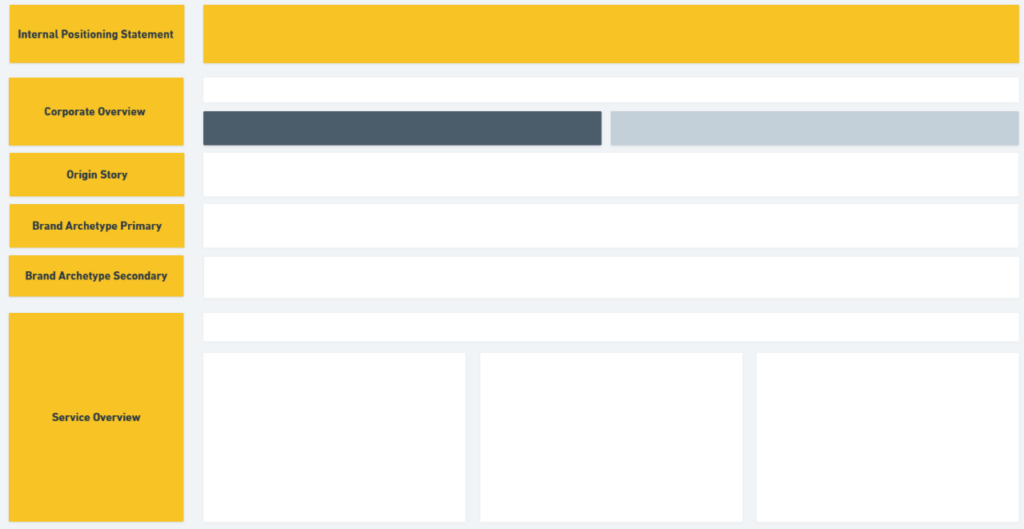
- Internal Positioning Statement:
- At its core, what does your company do that no one else does? What can you hand your hat on?
- Corporate Overview and Origin Story
- A summary of the company’s must-know information, including the history of your company, when it was founded, the services offered, and key points of differentiation. If you have an origin story on your “About Us” page, I usually link it here.
- Typically, companies have a full document for potential investors and C-suite communication, but I like to keep it brief for the messaging platform and hit the must-know.
- Brand Archetype:
- Your brand’s personality (e.g., The Innovator, The Caregiver). There are dozens of free resources online to help you determine your brand archetype. I suggest having a primary and a secondary.
- If you have brand guidelines, link to them here.
- Service Overview
- What do you provide the customers? Cover it at length here, but also make sure it’s written so anyone on the team can understand what you do.
- Ideal Customer Profiles (ICPs):
- Demographics: Age, gender, location, income level, company size, company industry…etc.
- Psychographics: Interests, values, lifestyle, challenges.
- Pain Points: Specific problems your product or service solves.
- Unique Selling Points (USPs), Unique Selling Propositions (USPs), or Key Takeaways:
- The primary benefit you offer to customers. How do you solve your specific ICPs pain points? What sets you apart from competitors in the market?
- Data & Proof Points:
- Relevant data that supports your claims (e.g., “Customers see a 30% increase in efficiency”).
- This is also a great area to link to any testimonials or case studies you have.
Action Steps:
- Document the Framework:
- Create a centralized document accessible to all team members.
- Use collaboration tools like Google Docs or specialized brand management software. I use Whimsical to visualize how everything flows together.
- Educate the Team:
- Hold workshops or training sessions to walk through the messaging framework.
- Encourage questions and provide clarifications.
- Ensure all content you create within the first 90 days flows through your Messaging Platform. As the team gets accustomed to it, still do monthly or quarterly checks.
- Regular Updates:
- Review and update the framework quarterly or as market conditions change.
- Ensure everyone is informed about updates.
2. File & Asset Organization: Find What You Need Fast
Disorganization is a silent productivity killer. Scattered files, misplaced assets, no campaign briefs (“What was the goal of this campaign, to begin with?”), and unclear naming conventions can waste valuable time. Research indicates employees waste nearly 20% of their time searching for internal information… That’s one business day per week… Yeah, it’s an issue.
Teams do not do this step because it can be a huge lift, especially at older companies. Just thinking of reorganization is incredibly daunting, but it will improve the team’s sanity in the long run.
The Impact of Poor Organization:
- Time Wasted:
- Employees can spend up to 20% of their time searching for information.
- Frustration and Errors:
- Misplaced files can lead to the use of outdated assets or incorrect information. Nothing is worse than an employee running with an outdated graphic that you spent hours creating just last month.
- Delayed Campaigns:
- Launches get postponed due to missing or inaccessible assets.
Strategies for Effective Organization:
- Centralize Storage:
- Use cloud-based storage solutions like Google Drive, Dropbox, or a Digital Asset Management (DAM) system.
- Ensure all team members have the necessary access permissions.
- Create Clear Folder Structures:
- Organize by projects, campaigns, content types, or dates.
- Example Structure:
- Marketing
- Campaigns
- 2023-Q3_Product_Launch
- Approved Creative Assets
- Archived Creative Assets
- In Progress Creative Assets
- Approved Copy
- Archived Copy
- In Progress Copy
- 2023-Q3_Product_Launch
- Campaigns
- Marketing
- Implement Naming Conventions:
- Use consistent, descriptive file names.
- Include dates, version numbers, and brief descriptors.
- I’ve been using the same format introduced to me by a mentor nearly a decade ago: “[Year][Month][Day of the month] Asset name.”
- For example: “20250214 Marketing Efficiency Blog”
- Archive Regularly:
- Move outdated or unused files to an archive folder.
- Keeps active folders uncluttered.
Action Steps:
- Appoint an Owner:
- Without one owner for this process, it will not be completed.
- Remove tasks from their queue to give them ample time to invest.
- Give them the authority to assign tasks and set hard deadlines.
- Audit Current Assets:
- Identify existing files and determine their relevance.
- Delete duplicates and obsolete materials.
- Develop an Organizational Policy:
- Document the folder structure and naming conventions.
- Share the policy with the team and store it in an easily accessible location.
- Train the Team:
- Hold a training session to walk through the new system.
- Encourage adherence to maintain consistency.
- Monitor and Maintain:
- Assign someone to oversee file organization.
- Regularly check for compliance and adjust as needed.
3. Project Management: Keep Everyone on the Same Page
When projects lack clear direction and oversight, they will fail. It’s not a matter of if they fail but when they fail. You will get lucky, live on the wild side, and pull a few projects off, but this is a dangerous game in the long run. Effective project management ensures that your team works cohesively towards shared goals. Not just works towards, but actually hits campaign deadlines and requirements.
The Pitfalls of Poor Project Management:
- Missed Deadlines:
- Lack of clarity on responsibilities can lead to tasks falling through the cracks.
- Scope Creep:
- Without defined parameters, projects can expand beyond their original intent.
- Team Burnout:
- Overloading team members due to poor resource planning (read about monthly marketing planning here). I’ve seen it repeatedly: One high-achieving team member gets 60 hours of work assigned to them for a week…, but they only have 40 hours (unless that is your team culture, in which case they will burn out and leave).
Choosing the Right Tool:
- Assess Team Needs:
- The size of the team, complexity of projects, and required features.
- Popular Options:
- Google Sheets: Simple and accessible for basic tracking. While Excel files can work, you need something everyone can access at any time that is updated in real time.
- Asana: Offers task management, timelines, and workload views.
- Trello: Utilizes boards and cards for a visual workflow.
Key Features to Utilize:
- Task Assignments:
- Assign tasks to specific team members with due dates.
- Progress Tracking:
- Use status updates (e.g., “Not Started,” “In Progress,” “Completed”).
- Dependencies:
- Identify tasks that rely on the completion of others.
- Priorities:
- Not all tasks are created equal. Make sure the team prioritizes time-sensitive ones.
- Bandwidth
- As mentioned above, estimate the time to complete a common task and add that to your project management tool. It will help you avoid setting unrealistic expectations.
- Milestones and Deadlines:
- Set key dates to monitor progress towards larger goals.
- Communication Integration:
- Commenting features, @mentions, and notifications keep discussions centralized.
Best Practices:
- Make this the New Norm:
- People can hate change even if it makes their lives easier in the long run. Make using your project management tool an integral part of their daily activities—no exceptions.
- Define Clear Roles and Responsibilities:
- Everyone knows what’s expected of them.
- Establish Project Timelines:
- Realistic schedules that account for potential delays.
- Regular Check-Ins:
- Short meetings or updates to address issues promptly.
- Post-Project Reviews:
- Analyze what worked and areas for improvement.
4. Communication: Optimize Meetings
Communication should facilitate work, not hinder it. Overloaded inboxes and excessive meetings disrupt focus and slow progress.
The Hidden Costs of Poor Communication:
- Time Drain:
- Frequent interruptions prevent deep, focused work.
- Misalignment:
- Important information gets lost in lengthy email threads.
- Frustration:
- Team members feel overwhelmed and disengaged.
Strategies to Enhance Communication Efficiency:
- Implement Structured Meetings and Cadence:
- Weekly, 15-30 minute 1:1 with your direct reports
- This is a quick check-in to see how their week looks. What roadblocks do they have? Where do they see issues arising? How can you help them?
- Have this at the same time and on the same day each week, preferably earlier in the week, so you both understand expectations for the week ahead.
- Have action items and owners finalized at the end of the meeting.
- Weekly, 45-60 minute all department Level 10 meeting (aspects of this are from the Entrepreneurial Operating System – EOS):
- Fixed Agenda – Use the same agenda each week to be able to look back at the prior week for recurring issues. Drop down more significant issues to discuss at a later date to the bottom of the agenda for reference:
- Company goal/KPI review
- Departmental goal/KPI review
- Headlines or Wins from the team
- The week ahead: Department updates
- The week ahead: Projects/tasks
- Identify and discuss upcoming projects and solve any foreseeable issues that might pop up
- Conclude: Have the team rank the meeting from 1-10 (10 being high) on the effectiveness of the meeting to get a meeting average score.
- Have action items and owners finalized and noted on the agenda for reference at the end of the meeting.
- Have this at the same time and on the same day each week, preferably at the end of the week, so the team knows the expectations when they arrive at work on Monday and can plan accordingly.
- Fixed Agenda – Use the same agenda each week to be able to look back at the prior week for recurring issues. Drop down more significant issues to discuss at a later date to the bottom of the agenda for reference:
- Weekly, 15-30 minute 1:1 with your direct reports
- Reduce Meeting Frequency and Length:
- Only include essential personnel.
- Consider bi-weekly or monthly meetings for less critical topics.
- Embrace Asynchronous Communication:
- Tools like Slack, Microsoft Teams, or Loom:
- Facilitate quick updates without disrupting workflows.
- Use channels to organize discussions by topic or project.
- Warning: There can be too much of a good thing with this type of communication, where everyone thinks they should be “on” all the time. Set boundaries here. For example, no replies are needed before or after working hours.
- Warning #2: If something is urgent, don’t rely on the team member seeing your Slack promptly. Pick up the phone or walk to their office to make it happen.
- Tools like Slack, Microsoft Teams, or Loom:
- Establish Communication Norms:
- As just stated, define when to use emails versus instant messaging.
- Set response time expectations.
Action Steps:
- Audit Current Communication Practices:
- Identify inefficiencies and pain points.
- Develop a Communication Plan:
- Outline protocols for meetings, emails, and messaging.
- Educate the Team and Monitor Use:
- Share the plan and encourage feedback.
- Check-in with the team to see how the new system is working. Has it been beneficial? Has it hampered progress?
5. Review & Simplify Your Marketing Strategy
To cover all bases, marketing teams often spread themselves too thin. Social media, newsletters, cold email, blogs, co-marketing partnerships, SEO, UX, conferences/trade shows… The list goes on and on. As a small marketing team, prioritization matters. Focusing on the most impactful activities can lead to better results with less effort.
Signs You Need to Simplify:
- Content Overproduction:
- Producing content that isn’t generating engagement or leads. Or worse, content that hasn’t even been used in all channels. If you’re creating content, make sure you distribute it appropriately.
- Channel Overload:
- Maintaining a presence on platforms where your audience isn’t active.
- Inconsistent Messaging:
- See the messaging platform above. Differing messages across channels can confuse your audience.
Strategies to Streamline Your Marketing:
- Prioritize High-Performing Channels:
- Use analytics to identify where your efforts yield the best results.
- Reduce Content Frequency:
- Focus on quality over quantity.
- Example: If daily social posts aren’t increasing engagement, try posting more strategic content just twice weekly. Often, your leadership and prospects (frankly, no one besides the marketing team) won’t notice.
- Align Messaging Across All Platforms:
- Ensure your website, social media, ads, and sales materials tell a cohesive story.
- Optimize Nurture Sequences:
- Review email sequences for frequency and relevance.
- Test different intervals and content types.
Action Steps:
- Conduct a Marketing Audit:
- Assess the performance of each channel and campaign.
- Develop a Focused Strategy:
- Allocate resources to the most effective activities.
- Test and Iterate:
- Implement changes in phases and monitor results.
- Align the Team:
- Ensure everyone understands the strategic focus and their role in it.
Small Marketing Efficiency Gains Add Up

Efficiency doesn’t mean your team is doing ‘less’ or you’re cutting corners along the way. It’s about maximizing the team you have and their impact on the company. In almost all instances, subtraction is more powerful than addition. Minor improvements compound over time, leading to significant gains in productivity and results.
Consider the Impact:
- Time Savings:
- Saving 30 minutes per day per person adds up to:
- 2.5 hours per week per person.
- 12.5 hours per week for a team of five.
- Approximately 50 hours per month—more than a full-time week’s worth of productivity.
- Saving 30 minutes per day per person adds up to:
- Financial Benefits:
- Increased efficiency can lead to higher ROI on marketing activities.
- Potentially reduce costs by eliminating unnecessary tools or processes.
- With more bandwidth from the team you already have, you don’t need to hire additional employees.
- Team Well-Being:
- Reduced stress and burnout leading to less employee turnover. We all know how expensive employee turnover can be.
- Increased job satisfaction and retention.
Breaking Free:
Marketing efficiency is what powers small, agile teams and is the rocket fuel for smart, effective campaigns. Implementing these steps empowers your team to think about their day-to-day activities and what moves the needle, allowing them to focus on strategic initiatives and innovation.
Remember, subtraction is more powerful than addition. Embrace that mindset.
Next Steps:
- Share this Guide with Your Team:
- Align everyone around the importance of efficiency.
- Create an Action Plan:
- Prioritize which areas to address first and assign responsibilities.
- Monitor Progress:
- Regularly review the impact of changes and adjust as needed.
- Encourage Open Communication:
- Keep the dialogue going to identify new opportunities for improvement.
Rome wasn’t built in a day, nor will your high-powered marketing team.
Start small, be consistent, take your time, focus on the team, get people to take ownership, and watch marketing efficiency drive your entire organization forward.